



Chevy Infotainment 101: Getting the Most Out of Google Built-In | Bachman Chevrolet in Louisville, KY
You just drove home in your new Chevy, and that big, beautiful touchscreen is staring back at you. Now what? If your vehicle came with Google built-in — and most of today’s Chevy lineup does — you have a lot more capability at your fingertips than most owners ever tap into.
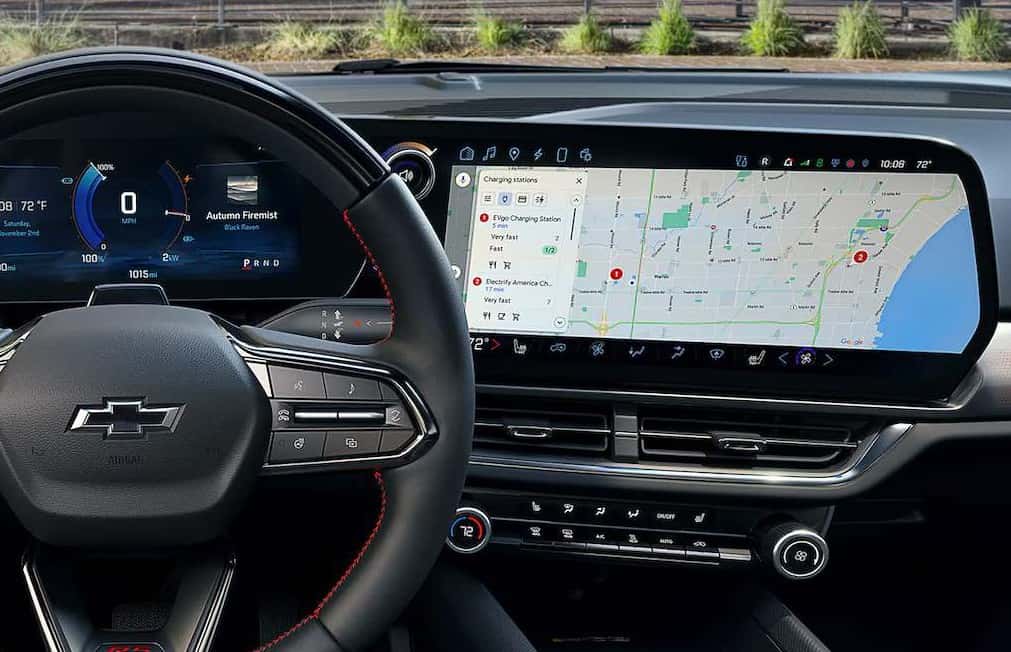
At Bachman Chevrolet in Louisville, we spend a lot of time walking new owners through their infotainment systems at delivery. This guide covers the highlights: what Google built-in actually is, how to set it up, and the features that make daily driving genuinely easier once you know they exist.
What Is Google Built-In?
Google built-in integrates Google’s apps and services directly into your Chevy’s infotainment system — no phone required. Instead of mirroring your smartphone, Google Maps, the Google voice assistant, and the Google Play app store run natively on the vehicle’s own hardware and data connection. The result is a faster, more deeply integrated experience: navigation appears in your driver display, voice commands can control vehicle functions like climate, and your apps live right on the center screen.
You’ll find Google built-in across the modern Chevy lineup, including the Trax, Trailblazer, Equinox, Traverse, Tahoe, Suburban, Colorado, Silverado, and Chevy’s electric vehicles.
Step One: Sign In and Set Up
You can use Google built-in without an account, but signing in with a free Google account is where the magic starts. Your saved places, contacts, and preferences sync to the vehicle, so the address you looked up on your phone at the kitchen table is waiting in the car. Setup takes about two minutes:
- From the home screen, open Settings and select Google or Profiles
- Sign in with your Google account (you can scan a QR code with your phone to skip typing)
- Accept the sync prompts for contacts and saved places
- Say “Hey Google” to confirm the voice assistant is listening
Pro tip: each driver in your household can set up their own profile, so your saved destinations and presets don’t get mixed up with your spouse’s.
Google Maps: Better in the Car Than on Your Phone
Native Google Maps is the centerpiece of the system, with live traffic, automatic rerouting, and speed limit display. Because it’s built in, navigation prompts can appear directly in your driver information center and available head-up display — right in your line of sight instead of on a phone in a cupholder.
Driving an electric Chevy like the Equinox EV or Blazer EV? Maps gets even smarter. Route to a DC fast charger and the vehicle automatically preconditions the battery on the way, so it arrives at the ideal temperature for the fastest possible charging. Maps will also show charging stations along your route and estimate your battery level at arrival.
Voice Commands: Stop Poking at Menus
The voice assistant is the feature we most encourage owners to build a habit around, because it keeps your hands on the wheel and eyes on the road. Just say “Hey Google” (or press the talk button) and try:
- “Navigate to Kroger on Hurstbourne Parkway”
- “Set the temperature to 70 degrees”
- “Call Mom” or “Read my last text”
- “Play my road trip playlist on Spotify”
- “How’s the weather this weekend?”
And it keeps getting better: select Chevy models now feature Google Gemini, an AI assistant you can talk to naturally — ask it to plan a trip, summarize your texts, or answer just about any question, hands-free.
Google Play: Apps Without Your Phone
Open the Google Play store on your center screen and you can download apps that run directly in the vehicle — Spotify, podcast players, audiobook apps, and more. Because they’re installed in the car, your passengers can control the music without touching your phone, and parked-only entertainment apps like video streaming are available on select models while you wait in the school pickup line.
Yes, You Still Get Apple CarPlay and Android Auto
A common question we hear: does Google built-in replace smartphone mirroring? On Chevy’s gas-powered lineup, no — wireless Apple CarPlay and Android Auto compatibility come right alongside Google built-in, so you can use whichever you prefer, cord-free. One important exception: Chevy’s electric vehicles (Equinox EV, Blazer EV, and Silverado EV) use Google built-in exclusively and do not support phone mirroring. If that distinction matters to you, it’s worth experiencing the Google-native system in person — most drivers find it does everything their phone did and more.
Keep It Connected
Google built-in relies on your vehicle’s data connection. New Chevys include a trial of connected services, and after that, keeping features like live traffic, the voice assistant, and app downloads running requires an OnStar/Connected Services data plan. Your vehicle also receives over-the-air software updates through this connection, so the system improves over time. Our team can walk you through current plan options at delivery.
Get a Hands-On Demo at Bachman Chevrolet
Reading about it is one thing — using it is another. Whether you’re shopping for a new Chevy or you bought one from us six months ago and never got around to signing in, stop by Bachman Chevrolet in Louisville and we’ll happily give you a hands-on tour of Google built-in, get your account set up, and share a few favorite tricks. It’s your technology; you should be getting everything out of it.
Google Built-In FAQ
Do I need a Google account to use Google built-in?
No — core functions work without one. But signing in with a free Google account unlocks the personalized experience: saved places, synced contacts, and app preferences that follow you into the vehicle.
Does Google Maps in my Chevy require a subscription?
Google Maps itself doesn’t require a separate subscription, but it needs the vehicle’s data connection for live traffic and updates. That connectivity comes via a trial on new vehicles and an OnStar/Connected Services plan afterward.
Does Google built-in use my phone’s data?
No. It runs on the vehicle’s own built-in data connection, so it won’t drain your phone’s battery or data plan.
Can I still use Apple CarPlay with Google built-in?
On gas-powered Chevy models, yes — wireless Apple CarPlay and Android Auto compatibility are included alongside Google built-in. Chevy’s EVs (Equinox EV, Blazer EV, Silverado EV) use Google built-in exclusively and don’t support phone mirroring.
What is Google Gemini in my Chevy?
Gemini is Google’s AI assistant, now rolling out to select Chevy models with Google built-in. It goes beyond basic voice commands — you can speak naturally to plan trips, summarize messages, get answers to questions, and adjust vehicle settings.
How do I turn off “Hey Google” if I don’t want it listening?
Go to Settings, select Assistant & Voice, and toggle off the “Hey Google” voice prompt. You can still use the assistant anytime by pressing the talk button on the steering wheel.
Which Chevy models have Google built-in?
Nearly all of today’s lineup, including the Trax, Trailblazer, Equinox, Traverse, Tahoe, Suburban, Colorado, Silverado, and Chevy’s EVs. Availability of specific features can vary by model and trim — ask our team at Bachman Chevrolet about any vehicle you’re considering.
Can someone show me how to set all this up?
Absolutely. Stop by Bachman Chevrolet in Louisville any time — whether you bought your Chevy from us or not, our team is glad to help you get signed in, sync your phone, and learn the features that make ownership easier.
0 comment(s) so far on Chevy Infotainment 101: Getting the Most Out of Google Built-In | Bachman Chevrolet in Louisville, KY